
기록을 찾기 쉽게, 생각을 다시 움직이게.
혁신을 이룹니다, 오딘박스(OdinBOX)
무엇을 기록하나요
추천 글
직접 고른 글카테고리
전체 보기최신 글
더 보기반응형
안드로이드, 스튜디오, 투표, 어플리케이션, 앱
결과화면까지 출력되게 하기

과제일시 : 2020-03-31
지난 주 과제 당시했었던 투표 어플은 기능으로따지만 절반정도만 완성된 상태였습니다.
[DEVELOPMENT/모바일앱개발] - 안드로이드, 간단한 투표 앱 만들기
안드로이드, 간단한 투표 앱 만들기
안드로이드, 모바일, 어플리케이션, 개발, 스튜디오 간단한 투표 어플 만들기 어제는 간단한 계산기 어플을 만들어보았는데, 오늘은 이미지 투표 어플을 만들어보려고 한다. LinearLayout을 이용하여, Vertical..
odinbox.co.kr
이번엔 이 투표하는 어플의 생명을 불어넣는 결과 화면 출력을 하려고 합니다.

저번 주 했던 것은 위 게시글을 확인하고 오시면 됩니다 :D
먼저, 소스 코드를 보여드리겠습니다.
* File Name : AndroidManifest.xml
<?xml version="1.0" encoding="utf-8"?>
<manifest xmlns:android="http://schemas.android.com/apk/res/android"
    package="com.example.wellpic02">

    <application
        android:allowBackup="true"
        android:icon="@mipmap/ic_launcher"
        android:label="@string/app_name"
        android:roundIcon="@mipmap/ic_launcher_round"
        android:supportsRtl="true"
        android:theme="@style/AppTheme">
        <activity android:name=".ResultActivity"></activity>
        <activity android:name=".MainActivity">
            <intent-filter>
                <action android:name="android.intent.action.MAIN" />

                <category android:name="android.intent.category.LAUNCHER" />
            </intent-filter>
        </activity>
    </application>

</manifest>

* File Name : MainActivity.java
package com.example.wellpic02;

import androidx.appcompat.app.AppCompatActivity;

import android.content.Intent;
import android.os.Bundle;
import android.view.View;
import android.widget.Button;
import android.widget.ImageView;
import android.widget.Toast;

public class MainActivity extends AppCompatActivity {
    Button btnVoteFinish;
    @Override
    protected void onCreate(Bundle savedInstanceState) {
        super.onCreate(savedInstanceState);
        setContentView(R.layout.activity_main);

        final int[] voteCount = new int[9];

        for (int i = 0; i<voteCount.length; i++)
            voteCount[i] = 0;

        ImageView[] image = new ImageView[9];

        int []imageId = {R.id.imageView, R.id.imageView2, R.id.imageView3, R.id.imageView4,
                R.id.imageView5,R.id.imageView6,R.id.imageView7,R.id.imageView8,R.id.imageView9};

        final String[] imgName = {"그림1", "그림2", "그림3", "그림4", "그림5", "그림6", "그림7", "그림8","그림9"};

        for (int i = 0; i<voteCount.length; i++) {
            final int index;
            index = i;

            image[index] = (ImageView)findViewById(imageId[index]);
            image[index].setOnClickListener(new View.OnClickListener() {
                @Override
                public void onClick(View v) {
                    voteCount[index]++;
                    Toast.makeText(MainActivity.this, imgName[index] + "이 총 "+ voteCount[index] + "표", Toast.LENGTH_SHORT).show();
                }
            });
        }
        btnVoteFinish = (Button)findViewById(R.id.btnVoteEnd);
        btnVoteFinish.setOnClickListener(new View.OnClickListener() {
            @Override
            public void onClick(View v) {
                Intent sendIntent = new Intent(getApplicationContext(), ResultActivity.class);
                sendIntent.putExtra("imgName", imgName);
                sendIntent.putExtra("voteCount", voteCount);
                startActivity(sendIntent);
            }
        });
    }
}

* File Name : activity_main.xml
package com.example.wellpic02;

import androidx.appcompat.app.AppCompatActivity;

import android.content.Intent;
import android.os.Bundle;
import android.view.View;
import android.widget.Button;
import android.widget.ImageView;
import android.widget.Toast;

public class MainActivity extends AppCompatActivity {
    Button btnVoteFinish;
    @Override
    protected void onCreate(Bundle savedInstanceState) {
        super.onCreate(savedInstanceState);
        setContentView(R.layout.activity_main);

        final int[] voteCount = new int[9];

        for (int i = 0; i<voteCount.length; i++)
            voteCount[i] = 0;

        ImageView[] image = new ImageView[9];

        int []imageId = {R.id.imageView, R.id.imageView2, R.id.imageView3, R.id.imageView4,
                R.id.imageView5,R.id.imageView6,R.id.imageView7,R.id.imageView8,R.id.imageView9};

        final String[] imgName = {"그림1", "그림2", "그림3", "그림4", "그림5", "그림6", "그림7", "그림8","그림9"};

        for (int i = 0; i<voteCount.length; i++) {
            final int index;
            index = i;

            image[index] = (ImageView)findViewById(imageId[index]);
            image[index].setOnClickListener(new View.OnClickListener() {
                @Override
                public void onClick(View v) {
                    voteCount[index]++;
                    Toast.makeText(MainActivity.this, imgName[index] + "이 총 "+ voteCount[index] + "표", Toast.LENGTH_SHORT).show();
                }
            });
        }
        btnVoteFinish = (Button)findViewById(R.id.btnVoteEnd);
        btnVoteFinish.setOnClickListener(new View.OnClickListener() {
            @Override
            public void onClick(View v) {
                Intent sendIntent = new Intent(getApplicationContext(), ResultActivity.class);
                sendIntent.putExtra("imgName", imgName);
                sendIntent.putExtra("voteCount", voteCount);
                startActivity(sendIntent);
            }
        });
    }
}

* File Name : result.xml
<?xml version="1.0" encoding="utf-8"?>
<androidx.constraintlayout.widget.ConstraintLayout xmlns:android="http://schemas.android.com/apk/res/android"
    xmlns:app="http://schemas.android.com/apk/res-auto"
    xmlns:tools="http://schemas.android.com/tools"
    android:layout_width="match_parent"
    android:layout_height="match_parent"
    tools:context=".ResultActivity">

    <TableLayout
        android:layout_width="match_parent"
        android:layout_height="match_parent">

        <TableRow
            android:layout_width="match_parent"
            android:layout_height="match_parent" >

            <TextView
                android:id="@+id/tv01"
                android:layout_width="wrap_content"
                android:layout_height="wrap_content"
                android:text="TextView" />

            <RatingBar
                android:id="@+id/rBar01"
                android:layout_width="wrap_content"
                style="?android:attr/ratingBarStyleIndicator"
                android:layout_height="wrap_content" />
            style="?android:attr/ratingBarStyleIndicator"
        </TableRow>
        <TableRow
            android:layout_width="match_parent"
            android:layout_height="match_parent" >

            <TextView
                android:id="@+id/tv02"
                android:layout_width="wrap_content"
                android:layout_height="wrap_content"
                android:text="TextView" />

            <RatingBar
                android:id="@+id/rBar02"
                android:layout_width="wrap_content"
                style="?android:attr/ratingBarStyleIndicator"
                android:layout_height="wrap_content" />
            style="?android:attr/ratingBarStyleIndicator"
        </TableRow>
        <TableRow
            android:layout_width="match_parent"
            android:layout_height="match_parent" >

            <TextView
                android:id="@+id/tv03"
                android:layout_width="wrap_content"
                android:layout_height="wrap_content"
                android:text="TextView" />

            <RatingBar
                android:id="@+id/rBar03"
                android:layout_width="wrap_content"
                style="?android:attr/ratingBarStyleIndicator"
                android:layout_height="wrap_content" />
            style="?android:attr/ratingBarStyleIndicator"
        </TableRow>
        <TableRow
            android:layout_width="match_parent"
            android:layout_height="match_parent" >

            <TextView
                android:id="@+id/tv04"
                android:layout_width="wrap_content"
                android:layout_height="wrap_content"
                android:text="TextView" />

            <RatingBar
                android:id="@+id/rBar04"
                android:layout_width="wrap_content"
                style="?android:attr/ratingBarStyleIndicator"
                android:layout_height="wrap_content" />
            style="?android:attr/ratingBarStyleIndicator"
        </TableRow>
        <TableRow
            android:layout_width="match_parent"
            android:layout_height="match_parent" >

            <TextView
                android:id="@+id/tv05"
                android:layout_width="wrap_content"
                android:layout_height="wrap_content"
                android:text="TextView" />

            <RatingBar
                android:id="@+id/rBar05"
                android:layout_width="wrap_content"
                style="?android:attr/ratingBarStyleIndicator"
                android:layout_height="wrap_content" />
            style="?android:attr/ratingBarStyleIndicator"
        </TableRow>
        <TableRow
            android:layout_width="match_parent"
            android:layout_height="match_parent" >

            <TextView
                android:id="@+id/tv06"
                android:layout_width="wrap_content"
                android:layout_height="wrap_content"
                android:text="TextView" />

            <RatingBar
                android:id="@+id/rBar06"
                android:layout_width="wrap_content"
                style="?android:attr/ratingBarStyleIndicator"
                android:layout_height="wrap_content" />
            style="?android:attr/ratingBarStyleIndicator"
        </TableRow>
        <TableRow
            android:layout_width="match_parent"
            android:layout_height="match_parent" >

            <TextView
                android:id="@+id/tv07"
                android:layout_width="wrap_content"
                android:layout_height="wrap_content"
                android:text="TextView" />

            <RatingBar
                android:id="@+id/rBar07"
                android:layout_width="wrap_content"
                style="?android:attr/ratingBarStyleIndicator"
                android:layout_height="wrap_content" />
            style="?android:attr/ratingBarStyleIndicator"
        </TableRow>
        <TableRow
            android:layout_width="match_parent"
            android:layout_height="match_parent" >

            <TextView
                android:id="@+id/tv08"
                android:layout_width="wrap_content"
                android:layout_height="wrap_content"
                android:text="TextView" />

            <RatingBar
                android:id="@+id/rBar08"
                android:layout_width="wrap_content"
                style="?android:attr/ratingBarStyleIndicator"
                android:layout_height="wrap_content" />
            style="?android:attr/ratingBarStyleIndicator"
        </TableRow>
        <TableRow
            android:layout_width="match_parent"
            android:layout_height="match_parent" >

            <TextView
                android:id="@+id/tv09"
                android:layout_width="wrap_content"
                android:layout_height="wrap_content"
                android:text="TextView" />

            <RatingBar
                android:id="@+id/rBar09"
                android:layout_width="wrap_content"
                style="?android:attr/ratingBarStyleIndicator"
                android:layout_height="wrap_content" />
            style="?android:attr/ratingBarStyleIndicator"
        </TableRow>

        <TableRow
            android:layout_width="match_parent"
            android:layout_height="match_parent" >

            <Button
                android:id="@+id/button"
                android:layout_width="wrap_content"
                android:layout_height="wrap_content"
                android:layout_span="2"
                android:text="돌아가기" />
        </TableRow>
    </TableLayout>

</androidx.constraintlayout.widget.ConstraintLayout>

* File Name : ResultActivity.java
package com.example.wellpic02;
import androidx.appcompat.app.AppCompatActivity;

import android.content.Intent;
import android.os.Bundle;
import android.view.View;
import android.widget.Button;
import android.widget.RatingBar;
import android.widget.TextView;

public class ResultActivity extends AppCompatActivity {
    Button btnReturn;

    @Override
    protected void onCreate(Bundle savedInstanceState) {
        super.onCreate(savedInstanceState);
        setContentView(R.layout.result);

        Intent receiveIntent = getIntent();
        int[] voteCount = receiveIntent.getIntArrayExtra("voteCount");
        String[] imgName = receiveIntent.getStringArrayExtra("imgName");

        TextView[] tv = new TextView[voteCount.length];
        RatingBar[] rBar = new RatingBar[voteCount.length];

        int[] tvId = {R.id.tv01, R.id.tv02, R.id.tv03, R.id.tv04, R.id.tv05, R.id.tv06, R.id.tv07, R.id.tv08, R.id.tv09};
        int[] rBarId = {R.id.rBar01, R.id.rBar02, R.id.rBar03, R.id.rBar04, R.id.rBar05, R.id.rBar06, R.id.rBar07, R.id.rBar08, R.id.rBar09};

        for (int i = 0; i < tv.length; i++) {
            tv[i] = (TextView) findViewById(tvId[i]);
            tv[i].setText(imgName[i]);

            rBar[i] = (RatingBar) findViewById(rBarId[i]);
            rBar[i].setRating((float) voteCount[i]);

        }
        btnReturn = (Button) findViewById(R.id.button);
        btnReturn.setOnClickListener(new View.OnClickListener() {
            @Override
            public void onClick(View v) {
                finish();
            }
        });
    }
}
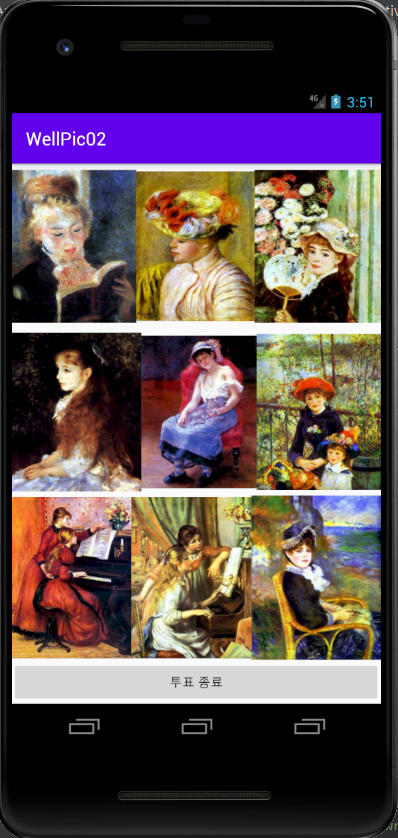
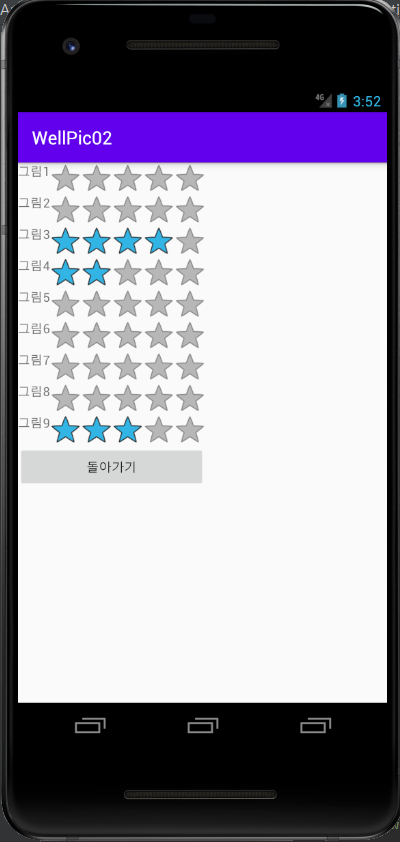
오늘은 소스 코드가 생각보다 길게 느껴지지만 쉽게 생각하고 이해하면 화면을 한게 더 만들어 한쪽화면은 투표 화면을 만들고 투표 종료를 누르게 되면, 결과를 출력하는 화면을 하나 더 생성을 했습니다.
*.java에는 기능을 넣는다고 생각하면 편할 것 같고, *.xml에는 화면을 구성한다고 생각하면 편할듯합니다.
실행화면
아직은 많이 알아가야하는 단계라고 생각합니다. 좀 더 노력하고 열심히 하겠습니다.

댓글 6