
기록을 찾기 쉽게, 생각을 다시 움직이게.
혁신을 이룹니다, 오딘박스(OdinBOX)
무엇을 기록하나요
추천 글
직접 고른 글카테고리
전체 보기최신 글
더 보기반응형
안드로이드스튜디오,안스,아이폰,버전,업데이트,확인,명함관리,저장기능,SQL,php,java,kotlin
명함관리 기능 구현

과제 일시 : 2020-06-13
이번에는 명함관리 기능을 구현해보도록 하겠습니다, 처음으로 PHP와 SQL을 연동하여 앱을 만들어보았습니다. 생각보다 잘 되질않아 이곳저곳 찾아보면서 해봤는데 뜻대로 진행이 안되 많이 갑갑했지만 되는 모습을 보니 뿌듯한 마음이 들었습니다.
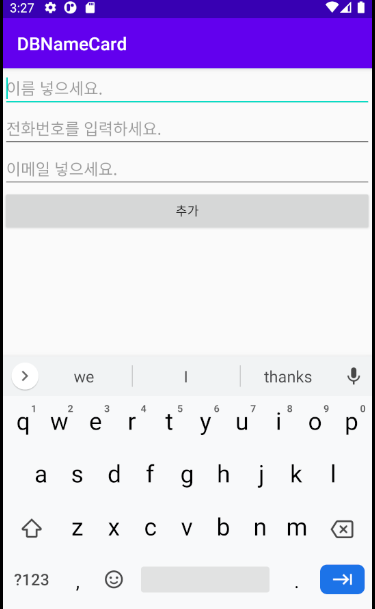
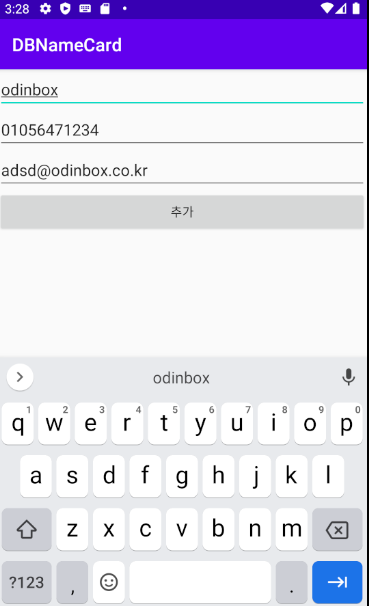
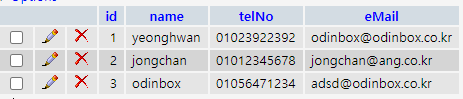
프로그램은 잘 동작하고 있습니다 :D
Source Code :
** MainActivity.java

package com.example.dbnamecard;

import androidx.appcompat.app.AppCompatActivity;

import android.os.Bundle;
import android.util.Log;
import android.view.View;
import android.widget.Button;
import android.widget.EditText;
import android.widget.Toast;

import java.io.BufferedReader;
import java.io.InputStreamReader;
import java.io.OutputStreamWriter;
import java.net.HttpURLConnection;
import java.net.URL;

public class MainActivity extends AppCompatActivity {


        EditText etName, etTelNo, etMail;
        Button btnSave;

        @Override
        protected void onCreate(Bundle savedInstanceState) {
            super.onCreate(savedInstanceState);
            setContentView(R.layout.activity_main);

            etName = (EditText)findViewById(R.id.etName);
            etTelNo = (EditText)findViewById(R.id.etTelNo);
            etMail = (EditText)findViewById(R.id.etMail);
            btnSave = (Button)findViewById(R.id.btnSave);

            btnSave.setOnClickListener(new View.OnClickListener() {
                @Override
                public void onClick(View v) {
                    dataInsert();
                }
            });

        }

        public void dataInsert() {
            new Thread(){
                public void run() {
                    try {
                        URL url = new URL("http://10.0.2.2/app/insert.php/"); // AVD 로컬 주소 : 10.0.2.2
                        HttpURLConnection http = (HttpURLConnection) url.openConnection();
                        http.setDefaultUseCaches(false);
                        http.setDoInput(true);
                        http.setRequestMethod("POST");
                        http.setRequestProperty("content-type", "application/x-www-form-urlencoded");
                        StringBuffer buffer = new StringBuffer();
                        buffer.append("name").append("=").append(etName).append("/").append(etTelNo).append("/").append(etMail).append("/");
                        OutputStreamWriter osw = new OutputStreamWriter(http.getOutputStream(),"utf-8");
                        osw.write(buffer.toString());
                        osw.flush();
                        InputStreamReader isr = new InputStreamReader(http.getInputStream(),"utf-8");
                        final BufferedReader bufferedReader = new BufferedReader(isr);
                        while (bufferedReader.readLine() != null) {
                            System.out.println(bufferedReader.readLine());

                        }
                    } catch(Exception e){
                        System.out.println("인터넷 연결을 확인하세요..");
                        Log.e("error","인터넷 확인", e);
                    }
                }
            }.start();
        }
    }

    ** activity_main.xml
    <?xml version="1.0" encoding="utf-8"?>
<androidx.constraintlayout.widget.ConstraintLayout xmlns:android="http://schemas.android.com/apk/res/android"
    xmlns:app="http://schemas.android.com/apk/res-auto"
    xmlns:tools="http://schemas.android.com/tools"
    android:layout_width="match_parent"
    android:layout_height="match_parent"
    tools:context=".MainActivity">

    <LinearLayout
        android:layout_width="match_parent"
        android:layout_height="match_parent"
        android:orientation="vertical">

        <EditText
            android:id="@+id/etName"
            android:layout_width="match_parent"
            android:layout_height="wrap_content"
            android:ems="10"
            android:hint="이름 넣으세요."
            android:inputType="textPersonName"/>
        <EditText
            android:id="@+id/etTelNo"
            android:layout_width="match_parent"
            android:layout_height="wrap_content"
            android:ems="10"
            android:hint="전화번호를 입력하세요."
            android:inputType="textPersonName"/>

        <EditText
            android:id="@+id/etMail"
            android:layout_width="match_parent"
            android:layout_height="wrap_content"
            android:ems="10"
            android:hint="이메일 넣으세요."
            android:inputType="textPersonName"/>

        <Button
            android:id="@+id/btnSave"
            android:layout_width="match_parent"
            android:layout_height="wrap_content"
            android:text="추가" />
    </LinearLayout>

</androidx.constraintlayout.widget.ConstraintLayout>

** AndroidManifest.xml
<?xml version="1.0" encoding="utf-8"?>
<manifest xmlns:android="http://schemas.android.com/apk/res/android"
    package="com.example.dbnamecard">
    <uses-permission android:name="android.permission.INTERNET"></uses-permission> // 인터넷 사용 권환

    <application
        android:allowBackup="true"
        android:icon="@mipmap/ic_launcher"
        android:label="@string/app_name"
        android:roundIcon="@mipmap/ic_launcher_round"
        android:supportsRtl="true"
        android:usesCleartextTraffic="true" // 안드로이드 http 프로토콜 접속 시 예외발생 조치 코드
        android:theme="@style/AppTheme">
        <activity android:name=".MainActivity">
            <intent-filter>
                <action android:name="android.intent.action.MAIN" />

                <category android:name="android.intent.category.LAUNCHER" />
            </intent-filter>
        </activity>
    </application>

</manifest>
PHP :
** Insert.php

<?
$name = $_POST["name"];
$arr = explode("/", $name);
$connect = mysql_connect("localhost:3306", "계정 명", "비밀번호입력");
mysql_select_db("company", $connect);
$insertSQL = "insert into customer(id, name, telNo, eMail)
values(null, '$arr[0]', '$arr[1]', '$arr[2]')";
mysql_query($insertSQL, $connect);
mysql_close();
?>
댓글 0